The Worksheet
Where you work
A two dimensional array
Can be part of a Workbook
Worksheets in a Workbook can access each other
| Version |
Rows |
Columns |
| 2003 |
65,536 |
256 |
| 2007 |
1,048,576 |
16,384 |
| 2010 |
1,048,576 |
16,384 |
| 2013 |
1,048,576 |
16,384 |
Arrow keys move you around
Can click on a cell
Ctrl -> Ctrl down arrow gets you to the biggest cell in the spreadsheet
Ctrl <- Ctrl up arrow gets you to start
A-Z then AA-ZZ then AAA-XFD
Range
two or more cells, can be a row a column or a matrix/table
select a range by selecting a cell, left click and hold the button down and then drag.
Once a range is selected then a copy and cut work like in other Office applications.
Formula and Function
A formula is an expression
Put 1 in A1, 1 in B1 then =A1+B1 in C1
Formulas start with an = sign, otherwise Excel thinks you are entering data
The formula appears when you click on the cell that contains it
Click on C1 and the fx type in box should have =A1+B1 in it
A function can be used in a formula
Click on fx to see a list
You can add additional functions (Flexibility/Customization)
change c1 to have =sum(A1,B1) get same answer
If you get confused hit Esc and start over again.
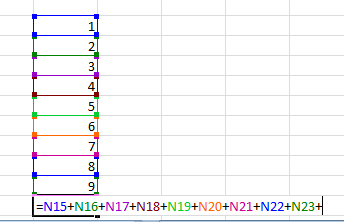
Color coded!
Cell References
Column then Row
Relative, Absolute & Mixed
Relative
In the example above the A1 is really a relative reference that means use the cell two places to the left and the B1 means use the cell reference
one place to the left. You can copy all three cells and the formula still works. The cell references change.
If you just copy the formula and not the data cells then the empty cells get a zero value.
Copy C1 to F5. You get 0.
Absolute
You can pin down a cell reference by using a $ sign.
change c1 to be =sum($A$1,$B$1)
now if you copy c1 it still accesses A1 and B1
Mixed
You can also just pin down a row or a column =sum($A1,$B1)
You can access other worksheets (Sheet2!A1,Sheet3!A1)
If you change the sheet name then the sheet reference will change
Entering commas or return selects a cell.
3D Reference
Formatting Cells
Keyboard Shortcuts
Function Examples
if function
=IF(A1>10,"Yes","No")
=IF(AND(N15>1,N16>4,N17>6),1,0) there is also OR
Count Text Occurrences
Count Logical Values
Count Blank/Nonblank Cells
Sumproduct
Nested If
DateDif
Weekdays
More
Extrapolating: Filling a Range
Custom Lists